JSON Action REST API
Discover and use FairCom's REST API
FairCom's APIs use a simple REST protocol called JSON Action. Each action is a remote procedure call you send as a JSON request and returns as a JSON response. The request and response are always JSON documents sent over HTTPS. The HTTPS verb is always POST, the URI, /api, does not change, and the default port is 8443, such as POST https://127.0.0.1:8443/api.
FairCom's JSON Action API supports most server features, including creating databases, tables, indexes, inserting/updating/deleting records, querying data using JSON and SQL, sending and receiving MQTT messages, configuring the server, managing accounts and access rights, configuring data connectors to retrieve and push data to devices and software, transforming inserted data automatically, running server-side JavaScript code, managing data change streaming, and so forth.
JSON Actions
The following table lists the major features that can be managed through FairCom's REST API.
Category | API Feature | Description |
|---|---|---|
Admin | Create a session to log securely into the REST API with a username and password, a client certificate, or API key. Retrieve and configure FairCom server settings. | |
Admin | Create and manage accounts for users and software to log into the server. Assign roles to accounts so they can read and write data to specific tables. | |
Admin | Create and manage the complete lifecycle of JavaScript code that you use to enrich, reshape, recalculate, and standardize collected data. | |
Admin | Create and manage labels that you can use to tag collected data. | |
DB | Create and manage databases, which are security containers for tables. | |
DB | Create and configure tables to store data collected by connectors, MQTT, SQL, and REST APIs. | |
DB | Create and manage indexes to quickly access and sort collected data. | |
DB | Insert, update, and delete data records. Inserting a record into an integration table causes FairCom Edge to transform it and deliver it to the table's output connectors. | |
DB | Use SQL to query collected data. Look up specific records by ID, timestamp, and user-defined fields. Quickly retrieve records in sorted and unsorted order. Create a cursor to tail the most recently inserted records or navigate forward or backward through collected data. | |
DB | Create transactions to perform operations on records using all-or-nothing semantics. Run separate insert, update, and delete operations as if they were one operation. Run queries that do not see changes made by concurrent users. | |
DB | Run SQL query, DDL, and DML statements against all data stored in the server. | |
Hub | Configure industrial connectors to collect data periodically from a device or software system. It can write data when it is collected or only when it changes. | |
Hub | Configure industrial connectors to deliver data in real-time to a device or software system. It guarantees delivery to other systems, such as cloud providers, enterprise applications, MQTT brokers, etc. | |
Hub | Manage integration tables. Create transform pipelines on integration tables that enrich, reshape, recalculate, and standardize collected data values. Use JavaScript and built-in transforms to convert a JSON value in the MQTT payload to user-defined fields and vice-versa. | |
MQ | Leverage the FairCom server as an event streaming platform by using REST to publish, subscribe, and retrieve MQTT messages. | |
MQ | Publish and subscribe to external MQTT brokers, which may be FairCom Edge, FairCom MQ, or an MQTT broker from another vendor. | |
MQ | Capture and deliver data changes to Kafka, the cloud, and applications. Create, start, and stop data change streams, which capture insert, update, and delete events on a FairCom server and deliver them as JSON messages to a FairCom MQ server. Applications can subscribe to the FairCom MQ server through MQTT or REST to receive live change events. They can also use SQL or JSON DB Actions to query the change stream. | |
MQ | Create and configure topics, map topics to tables, define retention policies, forward messages to external brokers, and subscribe to external brokers. | |
MQ | Centrally manage devices and software that connect to FairCom's MQTT broker. Change their settings and subscriptions. |
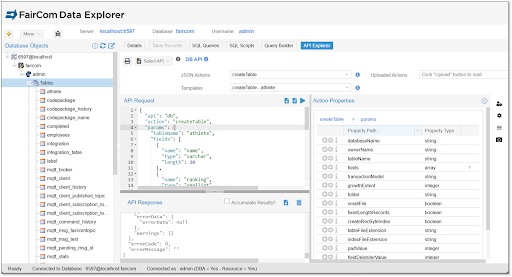
Use API Explorer to learn and develop JSON actions
API Explorer, FairCom Edge's integrated API editor, offers an interactive development environment for FairCom's REST API. It provides examples for each action, enabling users to quickly test API calls and view the outcomes.
JSON Action is RESTful
JSON Action employs the following REST features:
Client-Server Separation: Clients must evolve independently from the server.
JSON Action is a versioned, driverless, JSON-over-HTTP interface that works with all major programming languages.
Statelessness: Each request must contain all information needed to process it. The server stores no client session state other than an authentication token.
JSON Action supports this requirement because each request is self-contained and stateless. A few JSON actions, such as database transactions and cursors, are stateful across requests to deliver results quickly and efficiently.
Cacheability: Responses must define themselves as cacheable or not.
JSON Action uses the POST verb to signal when its resources are not cacheable by proxy servers. The FairCom server automatically provides internal caching optimized for rapidly changing data, particularly for queries that involve joining and filtering results across multiple tables—a task proxy servers are not equipped to handle effectively.
Uniform Interface: Each request must be identified by a URI, use a standard interface representation, be a self-descriptive message, and optionally use HATEOAS (Hypermedia as the Engine of Application State).
JSON Action uses URIs and JSON documents to provide a uniform, self-descriptive interface. Unlike most REST APIs, JSON Action embeds resource identifiers within the JSON document itself, making each action fully self-contained and descriptive. This design allows JSON Action to function seamlessly across various protocols such as HTTP, WebSocket, and MQTT, and also simplifies the process of capturing and replaying actions.
Layered System: Clients may transparently communicate to the server through intermediary servers.
JSON Action supports multiple layers between the client and server, including load balancers, proxies, and API gateways. It also supports cross origin resource sharing (CORS).
Code on Demand: Clients may send executable code to the server.
JSON Action enables authorized accounts to manage server-side JavaScript code, which can transform incoming and outgoing data and is executed securely within sandboxed Google V8 instances.